← Back to How-To Guides
 See Standard export instructions
Export from EasyEDA Pro
How to export your schematic from EasyEDA Pro as an .epro file
1
Select Your Schematic Sheet
In the Project panel on the left, click on the schematic page you want to export.
2
Save as Local Document
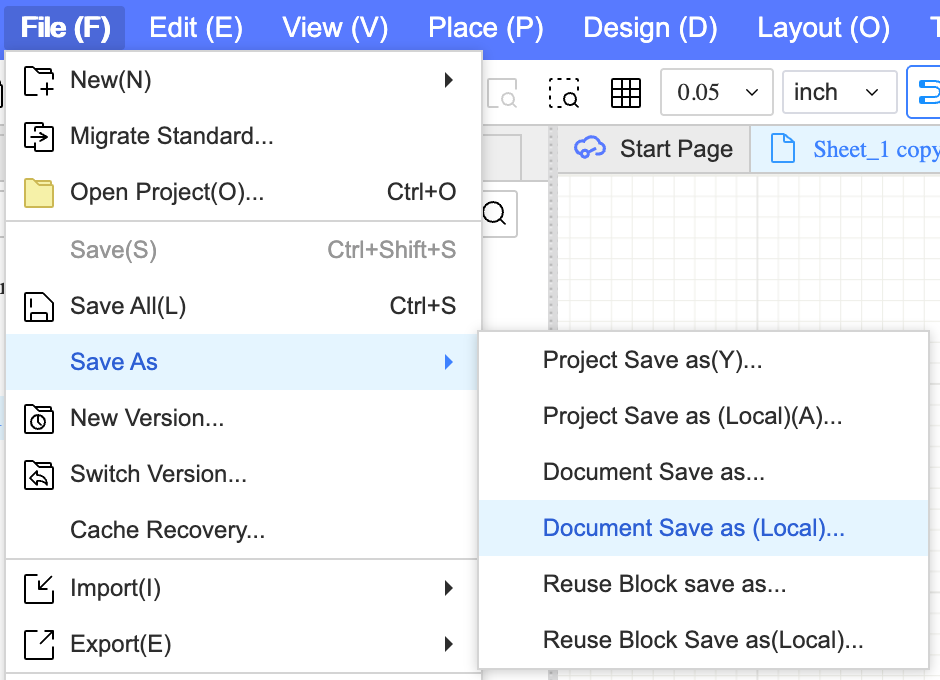
Go to File → Save As → Document Save as (Local)... and save the .epro file to your computer.
Important: Use 'Document Save as (Local)...' to get the .epro file. Other save options may not include all required data.
3
Upload to Schemalyzer
Go to your dashboard and drag-and-drop the .epro file onto the upload area, or click to select it.
Go to DashboardTroubleshooting
- If you see 'Invalid schema' error, ensure you used Document Save as (Local)...
- The file should have an .epro extension
- If your schematic has too many components, upgrade your plan